

We all written blogs, content and published on social media platforms. But ever you think that who visit my website, how much time they spend, are audience read my content? so many questions raised. You think it that you can track all the things easily, can see number of times visited in my page, who come , how much time spend, all the things you can measure. That is Google Analtyics
In simple terms, Google Analytics is like a doctor for your website; it tells you what is working well and what needs to be fixed. So that you can improve next time and get a better results.
Importance of Google analytics
Without having data and take decisions blindly give you lose. this is your biggest mistake. It help to take decisions quickly and better. It tell you in which are need improvement. It give data of your audience that they stay on your content or they like it it or not. It give accurate result. So you take better decision without any thinking.
How to set up Google Analytics:
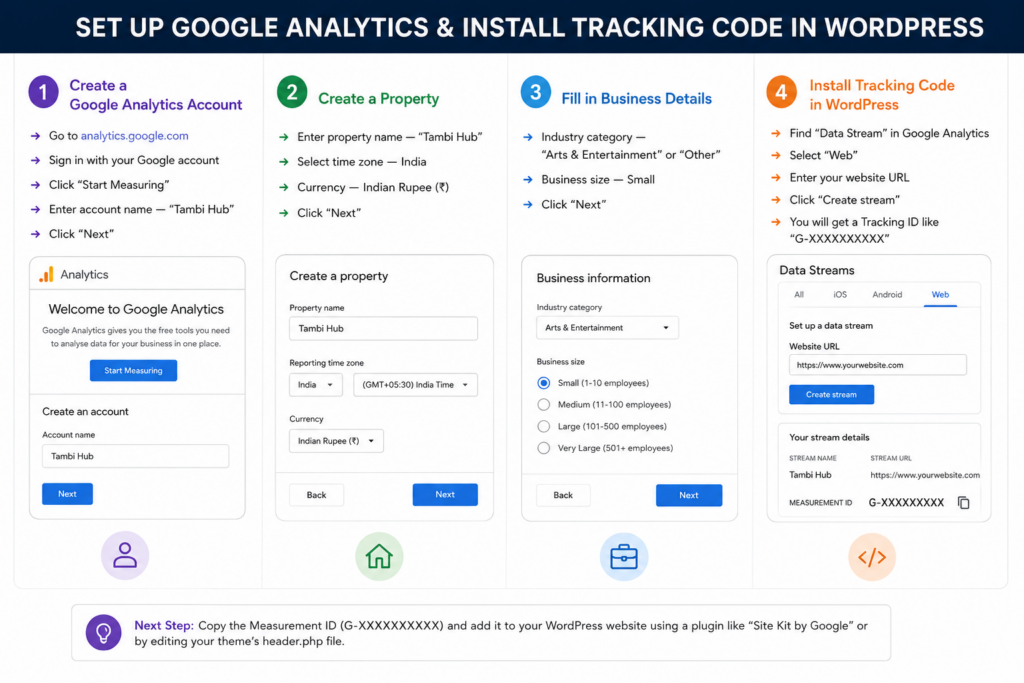
Important Google Analytics terms:
- Users: The number of people who visited your website. If a person visits once, they are counted as 1 user.
- Sessions: A single visit by a user constitutes a session. If a user visits daily, a new session is counted for each day.
- Page Views:The number of times pages were viewed. If a user views 5 pages, it counts as 5 page views.
- Bounce Rate:The percentage of visitors who arrive at your website and leave after viewing only one page. A lower bounce rate is better—it means people are staying on the site and viewing more pages.
- Traffic Source: Where visitors are coming from google, URL, Instagram, etc.
What you can see in Google Analytics
Real-time Report: You can see real reports like how many people are visited in your websites, how much time they spend on it.
Audience Report: It give report of your audience. It find out who your visitors are—their age, gender, location, and device.
Traffic report: See where your traffic is coming from—Google, Instagram, Facebook, or direct visits.
Decisions you can make using Google Analytics:
If a lot of traffic is coming from Instagram, focus more on Instagram.
If a particular blog post is very popular, write more blogs on that same topic.
If the bounce rate is high, improve the content.
If there are many mobile users, make the site mobile-friendly.
If a page is getting very few views, promote it.
Google Analytics v/s Google Search Console:
These are two distinct tools:
Google Analytics — Tracks what people do after arriving at your website.
Google Search Console — Shows how your website is performing on Google and which keywords it is ranking for.
Use both together — you get the complete picture.
My personal experience:
When I started writing blogs on Tambi Hub, I was initially very curious about whether anyone was actually reading them. The first time I saw—after installing Google Analytics—that someone outside of Jaipur was reading my blog, it was a great feeling. Analytics also revealed that my SEO-focused blog was attracting the most traffic, so I decided to write more blogs of that kind. Making decisions based on data makes things much easier.
